Sharing Animation on Unrelated Skeleton in UnrealEngine
Target Effect
This article primarily introduces a method to achieve the animation effect shown below:
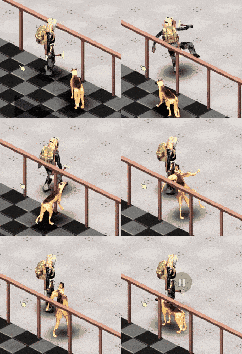
Unlike the standard approach of properly scaling and sharing animations through animation retargeting, this method allows you to obtain skeleton data that is entirely independent of the model. In other words, regardless of the model used, the skeleton data generated when playing the animation remains consistent.
Prerequisite Knowledge
First, let’s quickly review the basic animation assets of the Unreal Engine animation system:
Skeletons, skeletal meshes, and animation sequences are essential assets for playing animations in Unreal Engine.
In an ideal scenario, each asset serves its sole purpose (single responsibility):
The skeleton provides skeletal hierarchy data,
which, along with the animation sequence, supplies the pose data for each frame.
The skeletal mesh offers skinning information,
which is used to convert the pose data into vertex data for rendering the animated model.
Now, let’s take a closer look at the data items this article focuses on.
Skeleton
1
2
3
4
5
6
7
/**
 *	USkeleton : that links between mesh and animation
 *		- Bone hierarchy for animations
 *		- Bone/track linkup between mesh and animation
 *		- Retargetting related
 */
class USkeleton
Its core member variables and their uses:
TArray<struct FBoneNode> BoneTree
- Describes the hierarchical information between bones (multi-branch tree)
TMap<TObjectKey<USkinnedAsset>, TUniquePtr<FSkeletonToMeshLinkup>> SkinnedAssetLinkupCache
- Maps the bone indices between the reference skeleton of several skeletal models (mapping of bone indices from the skeleton to the reference skeleton of the model)
TMap< FName, FReferencePose > AnimRetargetSources
- Used for animation retargeting
FReferenceSkeleton ReferenceSkeleton
-
The
reference skeleton, which stores the initialbone and poseinformation from the original model, including thereference pose -
And many other pieces of information
TArray<TSoftObjectPtr<USkeleton>> CompatibleSkeletons- Skeletons it’s compatible with (Compatible Skeletons)
TArray<FAnimSlotGroup> SlotGroups- Montage slots and groups
TArray<FVirtualBone> VirtualBones- Virtual bones
TArray<TObjectPtr<class USkeletalMeshSocket>> Sockets- Sockets
TArray<TObjectPtr<UBlendProfile>> BlendProfiles- Profiles for blending
Skeletal Models
1
2
3
4
5
6
7
8
/**
 * SkeletalMesh is geometry bound to a hierarchical skeleton of bones which can be animated for the purpose of deforming the mesh.
 * Skeletal Meshes are built up of two parts; a set of polygons composed to make up the surface of the mesh, and a hierarchical skeleton which can be used to animate the polygons.
 * The 3D models, rigging, and animations are created in an external modeling and animation application (3DSMax, Maya, Softimage, etc).
 *
 * @see https://docs.unrealengine.com/latest/INT/Engine/Content/Types/SkeletalMeshes/
 */
class USkeletalMesh
Its core member variables and their purposes:
TObjectPtr<USkeleton> Skeleton
- Associated skeleton
FReferenceSkeleton RefSkeleton
-
Reference skeleton
-
Other information
TObjectPtr<USkeletalMeshLODSettings> LODSettings- Level of detail settings
TArray<TObjectPtr<class USkeletalMeshSocket>> Sockets- Sockets
TArray<TObjectPtr<UMorphTarget>> MorphTargets- Morph animations (vertex animations)
Animation Sequence
1
class UAnimSequence : public UAnimSequenceBase
Its core member variables and their purposes:
TObjectPtr<class USkeleton> Skeleton
- Associated skeleton
FRawCurveTracks RawCurveData
- Animation curve
raw values
TArray<struct FAnimNotifyEvent> Notifies
-
Animation notifications
-
Others
TScriptInterface<IAnimationDataModel> DataModelInterface- Animation
source datacarrier (Raw Data)
TObjectPtr<class UAnimBoneCompressionSettings> BoneCompressionSettings- Bone compression settings
TObjectPtr<class UAnimCurveCompressionSettings> CurveCompressionSettings- Curve compression settings
FName RetargetSource- Retargeting source
TArray<FAnimSyncMarker> AuthoredSyncMarkers- Sync markers
- Animation
USkeletalMeshComponent
1
2
3
4
5
6
7
/**
 * SkeletalMeshComponent is used to create an instance of an animated SkeletalMesh asset.
 *
 * @see https://docs.unrealengine.com/latest/INT/Engine/Content/Types/SkeletalMeshes/
 * @see USkeletalMesh
 */
class USkeletalMeshComponent
Its core member variables and their uses:
TArray<FBoneIndexType> RequiredBones
- The indices of the bones needed at current model’s
Level of Detail: e.g.,0, 5, 10, 13...
TSharedPtr<struct FBoneContainer> SharedRequiredBones
- The
key data structurenecessary forskeletal animation evaluation, shared amongall animation instanceson this component.
Bone Container
1
struct FBoneContainer
It’s the
core dataforskeletal animation evaluation, no matter what modle or skeleton asset you use for the final presentation, at the evaluation time, all animation instances and it’s animation nodesnormallywould only use data fromBoneContainer
Core member variables and their purposes:
TArray<FBoneIndexType> BoneIndicesArray
- The indices corresponding to the bones required at the current
level of detailin thereference skeleton
TWeakObjectPtr<USkeletalMesh> AssetSkeletalMesh
- The skeletal model currently being utilized
TWeakObjectPtr<USkeleton> AssetSkeleton
- The skeleton currently being utilized
1
2
3
    // @see FBoneContainer::RemapFromSkelMesh
	SkeletonToPoseBoneIndexArray = LinkupTable.SkeletonToMeshTable;
	PoseToSkeletonBoneIndexArray = LinkupTable.MeshToSkeletonTable;
TArray<int32> SkeletonToPoseBoneIndexArray
- Mapping from
bone index of the skeletontobone index of reference skeleton of the model(the variable name seems ambiguous; the code above is more intuitive)
TArray<int32> PoseToSkeletonBoneIndexArray
- Mapping from
bone index of reference skeleton of the modeltobone index of the skeleton(the variable name seems ambiguous; the code above is more intuitive)
TSharedPtr<FSkelMeshRefPoseOverride> RefPoseOverride
reference pose override
bool bDisableRetargeting
- Switch to disable retargeting
As can be seen, the actual situation is much more complex than ideal, as the expansion of system functionalities, such as animation notifications and retargeting, has added a lot of data to these asset types.
Additionally, aside from the skeletal assets themselves, skeletal models have their own reference skeletons, and animation sequences have their own skeletons, which complicates the relationships between assets and is also the reason they need to incorporate animation retargeting.
Implementation Detail
After thoroughly understanding the asset objects mentioned above and code flow, the implementation should become ituitive:
Based on the default USkeletalMeshComponent::InitAnim process, when initializing SharedRequiredBones, find a way to override SharedRequiredBones::AssetSkeleton, and then proceed with the subsequent steps, such as establishing the bone index mapping with AssetSkeletalMesh, etc.:
1
2
3
4
FBoneContainer::InitializeTo
FBoneContainer::Initialize
// ... override AssetSkeleton
FBoneContainer::RemapFromSkelMesh
Currently, due to the engine did not expose the relevant interfaces by default, it can only be achieved by modifying the engine source, and some code adjustments are necessary. The official support for this may not be guaranteed in the future. This is a risk point of the current solution.
An example applied to Project Zomboid with German Shepherd Vault is to first use the German Shepherd Model to execute InitAnim. During the initialization of SharedRequiredBones, override AssetSkeleton with the Character Skeleton, and then the subsequent FBoneContainer::RemapFromSkelMesh is executed (the German Shepherd skeleton and the character skeleton need to have a similar hierarchy, and the names of the bones at the common hierarchy must match).
Related Thoughts
How is the mapping of bone indices established?
By default, mapping is done through bone names, meaning bones with the same name are mapped to each other.
See:
1
USkeleton::BuildLinkupData
CopyPoseFromMesh
See:
1
2
3
FAnimNode_CopyPoseFromMesh::BoneMapToSource
FAnimNode_CopyPoseFromMesh::Evaluate_AnyThread
FAnimNode_CopyPoseFromMesh::ReinitializeMeshComponent
UPoseableMeshComponent
See:
1
UPoseableMeshComponent::CopyPoseFromSkeletalComponent
LeaderPoseComponent
See:
1
2
3
4
5
6
7
8
9
USkinnedMeshComponent::LeaderPoseComponent

// update bone index mapping
USkinnedMeshComponent::UpdateLeaderBoneMap

// rendering related
UpdateRefToLocalMatricesInner (SkeletalRender.cpp)

USkinnedMeshComponent::GetBoneTransform
You can see that the engine achieves similar functionality with different names through
index mapping.In other words, as long as the index mapping is established, to a certain extent,
animation sharing can be enforcedon any model.
Update Rate Optimization (URO)
Determine if Updates Can Be Skipped
See:
1
2
3
4
5
USkinnedMeshComponent::TickUpdateRate
FAnimUpdateRateManager::TickUpdateRateParameters
USkeletalMeshComponent::ShouldTickAnimation

FAnimUpdateRateParameters::SetTrailMode
Interpolated Skeleton Data
See:
1
2
3
4
USkeletalMeshComponent::RefreshBoneTransforms
USkeletalMeshComponent::ParallelAnimationEvaluation
USkeletalMeshComponent::ParallelDuplicateAndInterpolate
FAnimationRuntime::LerpBoneTransforms
What is the output of animation calculations when the animation blueprint graph is empty?
Reference Pose
See:
1
2
3
4
UAnimInstance::ParallelEvaluateAnimation
FPoseContext::ResetToRefPose
FBaseCompactPose::ResetToRefPose
FBoneContainer::FillWithCompactRefPose
What Data is Cached on CacheBones_AnyThread?
Bone data of the reference pose
See:
1
2
3
UAnimInstance::ParallelEvaluateAnimation
FAnimInstanceProxy::EvaluateAnimation_WithRoot
FAnimInstanceProxy::CacheBones / FAnimInstanceProxy::CacheBones_WithRoot
How to Blend/Interact/Apply Reference Poses with Animation Sequence Data
Skeleton data decompression process:
1
2
3
4
5
UAnimSequence::GetAnimationPose
UAnimSequence::GetBonePose
UE::Anim::Decompression::DecompressPose

// ACLImpl.h
It’s up to the compression algorithms: If the animation data does not exclude reference pose data during compression, that is, if
full datacompression is used, the skeletal data of the animation sequence will overwrite the reference pose. This was the case with the old compression algorithm.After version
5.3of Unreal Engine, the default compression algorithm for animations switched to ACL. Under the default settings, it removes reference pose data when compressing animations, performingincremental datacompression where the increment is zero, meaning that tracks with data identical to the reference pose will be skipped; correspondingly, during decompression, tracks with data matching the reference pose will also be skipped. This allows for higher compression rates and faster decompression speeds. Because of this, reference pose information is needed during decompression.